Information for administrators
Good to know

Marking prompts as favorites

If you use certain prompts frequently, it is a good idea to mark them as favorites. As favorites, they are listed in a separate folder in the upper part of the prompt area, where they can be found and used quickly. The prompt also remains in its original location, so your prompt organization stays exactly as you are used to.If certain prompts are used frequently, it is a good idea to mark them as favorites. As such, they are listed in a separate folder in the top half of the prompt area, where they can be quickly found and used. The prompt is also still in its original location, so that your prompt sorting remains as usual.

How to mark a prompt as a favoriteHow to mark a prompt as a favorite

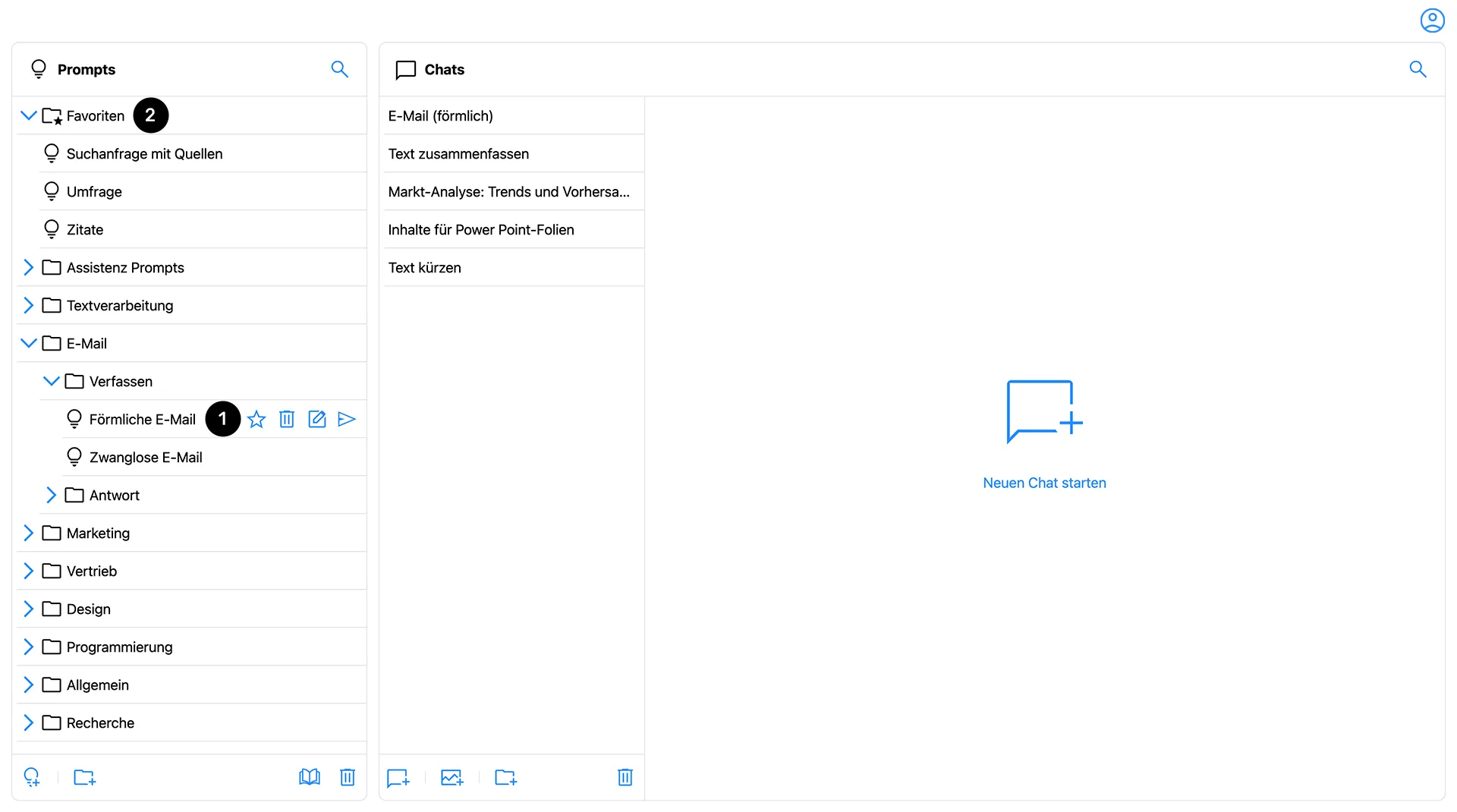
The prompt area with the Favorites folder.

In the prompt overview, select the prompt you would like to mark as a favorite. Then, click the star next to the prompt name (1). If the star icon is now filled in, the prompt has been set as a favorite. Click again to remove the prompt from your favorites list. The star will then return to an outline.In the prompt overview, select the prompt that you want to set as a favorite. Then click on the star next to the prompt name . If the star icon is now filled out, the prompt is set as a favorite. Click again to remove the prompt from the favorites list. The star then reappears as a contour.

How to find your favorite promptsHow to find your favorite prompts

At the top of your prompt overview, you will find a folder named "Favorites," which you can also identify by the star icon (2). When a prompt is marked as a favorite, a duplicate automatically appears in this folder. If multiple prompts are added, they are sorted alphabetically within the Favorites folder.In your prompt overview, there is a folder called “Favorites” at the top, which you can also recognize by the star icon . If a prompt is set as a favorite, a duplicate automatically appears in this folder. If multiple prompts are added, they are sorted alphabetically within the favorites folder.

‍